Advanced Guide to Adobe InDesign CC: Books & Brochures
$49
ENROLL NOWCourse Overview
What You'll Learn
- You’ll bring together everything you’ve learned so far to complete advanced layout projects that really showcase your skills.
- By the end of this course, you’ll be able to: * Design and update dynamic Tables of Contents * Structure brochures using parent pages, grids, and drop caps * Export documents to professional PDFs or interactive 3D flipbooks * Use variable fonts, advanced saving techniques, and layout logic This course is designed for intermediate to advanced users who want to push their layout skills to a professional level.
- Instructor bio: Kate Silver is a graphic and shoe designer, Top Teacher on Skillshare, and instructor at the UK’s leading Adobe training center in London.
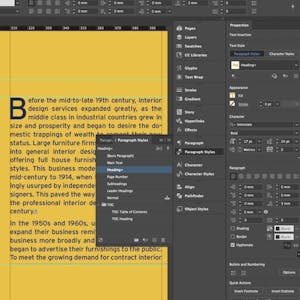
Ready to tackle long documents like brochures, eBooks, or multi-page PDFs? In this final course, join Kate Silver as you explore everything from creating a full Table of Contents to managing multiple parent pages and exporting interactive formats. You’ll bring together everything you’ve learned so far to complete advanced layout projects that really showcase your skills. By the end of this course, you’ll be able to: * Design and update dynamic Tables of Contents * Structure brochures using parent pages, grids, and drop caps * Export documents to professional PDFs or interactive 3D flipbooks * Use variable fonts, advanced saving techniques, and layout logic This course is designed for intermediate to advanced users who want to push their layout skills to a professional level. You’ll walk away with a full-length interior design brochure and other multi-page print/digital projects you can proudly add to your portfolio. To get the most out of this course, you should be confident using InDesign’s styles, effects, and basic layout tools. Instructor bio: Kate Silver is a graphic and shoe designer, Top Teacher on Skillshare, and instructor at the UK’s leading Adobe training center in London. She creates beginner and advanced courses on design software including Adobe Photoshop, Illustrator, InDesign, Canva, and more. With experience designing for brands like Jimmy Choo and Sophia Webster, Kate brings hands-on expertise to her classes, making complex tools simple and accessible. Her lessons focus on clarity, practical projects, and smart shortcuts to help students build real skills with confidence.
Course FAQs
Is this an accredited online course?
Accreditation for 'Advanced Guide to Adobe InDesign CC: Books & Brochures' is determined by the provider, Skillshare. For online college courses or degree programs, we strongly recommend you verify the accreditation status directly on the provider's website to ensure it meets your requirements.
Can this course be used for continuing education credits?
Many of the courses listed on our platform are suitable for professional continuing education. However, acceptance for credit varies by state and licensing board. Please confirm with your board and {course.provider} that this specific course qualifies.
How do I enroll in this online school program?
To enroll, click the 'ENROLL NOW' button on this page. You will be taken to the official page for 'Advanced Guide to Adobe InDesign CC: Books & Brochures' on the Skillshare online class platform, where you can complete your registration.